Blog
HTC HD2 (Leo 1.5 or T5160) and the HTC Debug Tools
4 minphones
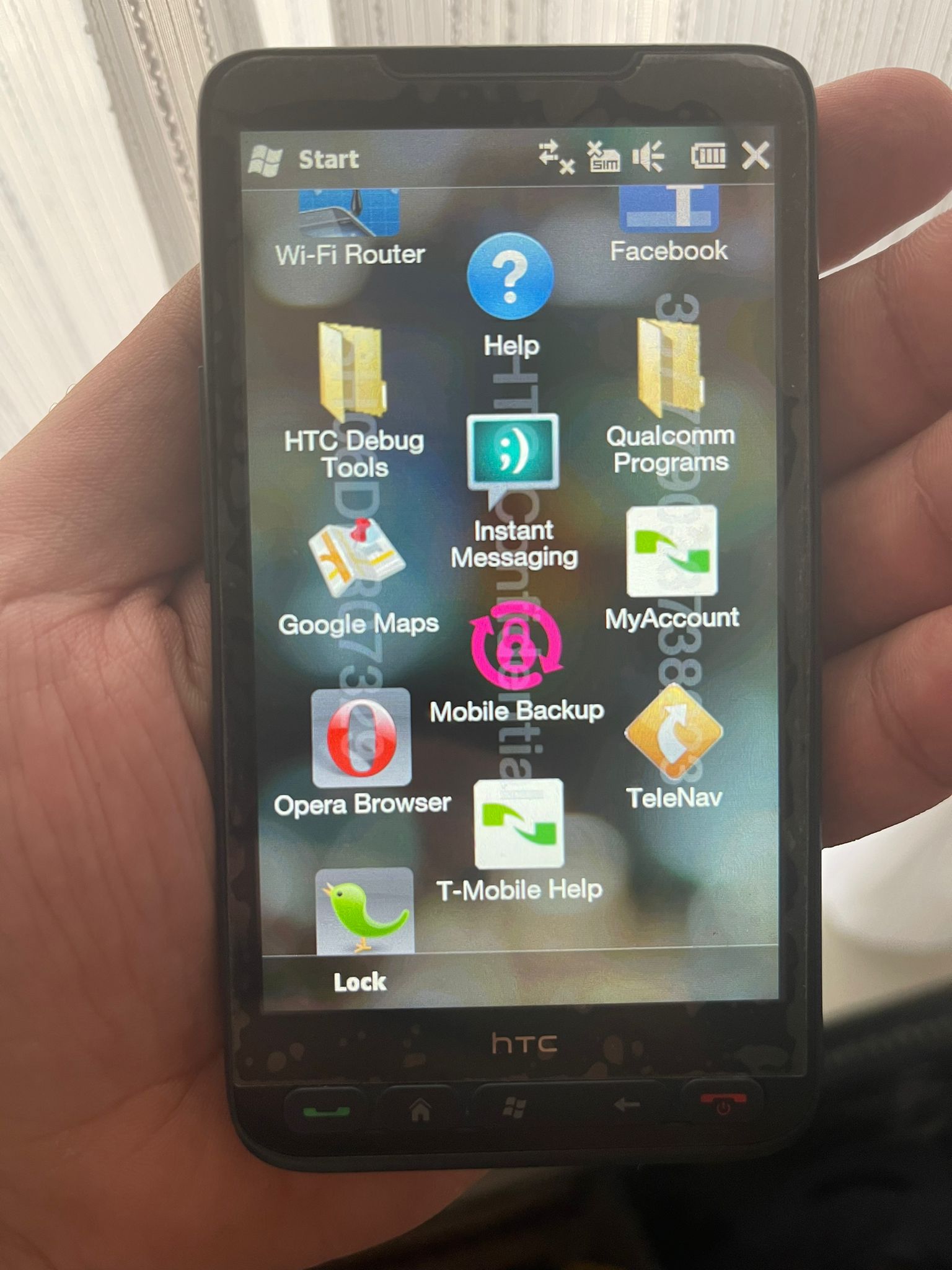
The HTC HD2 (Leo 1.5 or T5160) is commenly known as the HTC HD2 TMOUS (T-Mobile USA). The differences between the Leo 100 and the Leo 1.5 are the amount of internal storage (512MB Vs. 1GB), amount of RAM (320mb on the prototypes, 448MB on the Leo 100 before the 2.x or 3.x update, 512MB on the Leo 1.5), the Leo 1.5 is slightly longer in size and it had colored pick-up and hang-up/power buttons. This version was very sought after because of the 1GB internal storage. This made running other operating systems like Android or Windows Phone easier. With the Leo 100, you had to partially store the operating system on the internal drive and on a MicroSD-card. The official released device has the T-Mobile branding on the front top of the device.
This device is running the RUU_Leo_1_5_TMOUS_2.02.531.MASD_S__Radio_Signed_15.29.50.07U_2.06.50.04_TeleNav-5.5.42. The HTC MASD_S ROMs are engineering software version. Often packed with a MFG SPL (Engineering bootloader) and debug tools. Therefore, getting these ROMs was never easy. These were usually shared with engineers and not testers / HTC Elevate members. Here some screenshots of the HTC (and Qualcomm) Debug Tools:
When opening the Debug Tool you see the available options and its value. You can change the value and write it to the ROM. This is made posible because of the engineering bootloader. I managed to grab the help file. This shows all the options and the possible values. Here some pictures of the Debug Tool itself and the help file (check the build date):
DebugTool HELP
2006/10/18
Content
[0]Debug Method
[1]KITL IP
[2]KITL SubNet Mask
[3]OEMRETAILMSG Driver Flags
[4]OEMRETAILMSG Message Zone
[5]DebugLog Flags
[6]Power Saving Disable
[7]Bootloader Flags
[8]Radio Debug Flags
[9]Driver Disable
[0]Debug Method
Set the following value into this field:
0
Disable
1
Enable Ethernet
KITL with DHCP
2
Enable Ethernet
KITL with fixed-IP
3
Enable USB RNDIS
KITL
4
Enable Serial
KITL
A
Enable Serial
debug message output
11
Enable Passive
Ethernet KITL with DHCP
22
Enable Passive
Ethernet KITL with fixed-IP
33
Enable Passive
USB RNDIS KITL
44
Enable PassivevSerial KITL
Note:
1. USB RNDIS KITL use
the following setting on device.
IP :
169.254.53.135
MASK : 255.255.0.0
[1]KITL IP
Set the field if use
fixed-IP Ethernet KITL or
USB
RNDIS KITL
FFFEFDFC :
“252.253.254.255”
[2]KITL SubNet Mask
Set
the field if use
fixed-IP Ethernet KITL or
USB
RNDIS KITL
FFFEFDFC :
“252.253.254.255”
[3]OEMRETAILMSG
Driver Flags
BIT
Item
0
(reserved)
1
Display
2
USB Client
3
USB Host
4
Camera
5
Misc
6
I2C
7
Keyboard
8
Touch Panel
9
Battery
10
SPI
11
Kernel
12
SD
13
WLAN
14
TPD
15
Audio
16
Serial
17
Bluetooth
18
CF
19
FIR
20
SIR
21
RIL
22
GPS
23
PSM
24
LED
25
Frontlight
26
Serial COM
27
Virtual COM Port
28
NAND
29
ActiveSync
30
DEX
31
All Drivers
[4]OEMRETAILMSG
Message Zone
BIT
Item
0
1
2
3
4
5
6
7
8
9
10
11
12
13
14
15
16
INIT_ROUTINE
17
POWER_HANDLER
18
NORMAL_SLEEP
19
CRITICAL_SHUTDOWN
20
BATTERY_FAULT
21
DEAD_LOOP
22
UXECPECTED_ROUTINE
23
WAKEUP_EVENT
24
IOCONTROL
25
INTR
26
FUNCTION
27
WARNING
28
ERROR
29
30
31
CONTROL_SHOW_TIME
[5]DebugLog Flags
Simple DebugLog : 5
Simple DebugLog to SD : D
System DebugLog : 435
System DebugLog to SD : 43D
BIT
Item
0
Disable Log
Timeout
1
Enable delay log
2
Rotate dbglog file
3
Save to storage
card
4
Enable
DELAYSHIPMSG
5
Dump System Info
6
Dump Filesys Activity
7
Dump Memory Info
8
Dump Phone
Activity
9
Dump Key
Activity
10
Disable Auto
Reset
11
Dump CPU loading
12
13
14
15
16
17
LCD Message
18
19
20
21
22
23
24
25
26
27
28
29
30
Dump Power
Management
31
Enable BT Log
[6]Power
Saving Disable
BIT
Item
0
OEMIdle Disable
1
OEMIdle no idle
2
OEMIdle no TCXO down
3
OEMIdle no power collapse
4
OEMPowerOff Disable
5
OEMPowerOff Idle
6
OEMPowerOff TCXO down
7
OEMPowerOff power collapse
8
Disable DFVM all
9
Disable DFVM
volt change
[7]Bootloader Flags
BIT
Item
0
Auto Enter Bootloader
1
Force USB
connection
[8]Radio Debug Flags
BIT
Item
0
Enable ATCMD Log
1
Enable RIL Ioctl Log
2
3
4
5
6
7
8
MARM use UART
9
MARM use USB
10
MARM use SD
11
12
13
14
15
[9]Driver Disable
BIT
Item
0
Disable DEX
1
Disable I2C
2
Disable SMD
3
Disable DPRAM
4
Disable Keypad
5
Disable
Backlight
6
Disable LED
7
Disable MISC
8
Disable USB
9
Disable SD
10
Disable BT
11
Disable Battery
12
Disable TAI/aDSP
13
Disable Audio
14
Disable Camera
15
Disable RIL